
Per-application volume control and OSD for Linux desktops.
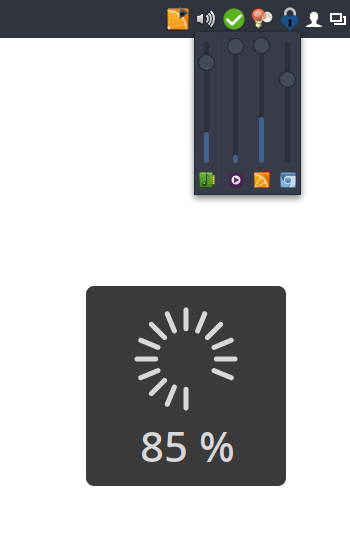
I couldn't find a simple tray icon that allows to control multiple applications easily from the task bar. So I wrote my own.
Bug reports and patches welcome!
It's not meant to be a replacement for a full-featured mixer application. If you're looking for that check out the excellent pavucontrol.
- Runs on virtually every desktop environment (via SNI, see System tray host)
- Control main volumes as well as individual applications
- Mute individual applications
- Shows application icons and names
- Per-application VU meter
- Click to open the mixer popup; right-click to open pavucontrol (or custom mixer application)
- Mouse-wheel support
- On-screen volume display (OSD)
- OSD customizable via CSS file
- Supports X11 and Wayland
The tray icon uses SNI, so something in the session has to provide a tray host: KDE, Xfce, Cinnamon, MATE, LXQt, GNOME (with an extension), waybar's tray module on Hyprland and other Wayland compositors, etc. Window managers with an XEmbed-only systray (dwm and derivatives) need a bridge such as snixembed. Without any tray host volctl still runs, but only the OSD works: the mixer popup and the preferences are reached from the tray icon.
Available in AUR: volctl or volctl-bin
Install from source using Cargo:
cargo install --git https://github.com/buzz/volctl.gitInstall the GSettings schema manually.
-
Clone this repository and build in release mode:
cargo build --release
-
Copy the binary to a location in your
$PATH:cp target/release/volctl ~/.local/bin/
Install the GSettings schema manually.
volctl uses GSettings to store preferences. The schema file must be installed for the settings to work. Copy the schema XML and compile the schemas:
PREFIX="${HOME}/.local"
mkdir -p "$PREFIX/share/glib-2.0/schemas/"
curl -fsSL https://raw.githubusercontent.com/buzz/volctl/main/data/apps.volctl.gschema.xml \
  -o "$PREFIX/share/glib-2.0/schemas/apps.volctl.gschema.xml"
glib-compile-schemas "$PREFIX/share/glib-2.0/schemas/"The OSD can be customized with ~/.config/volctl/osd.css, reloaded on
change (no restart needed). The OSD window is a regular GTK4 CSS node
(selected as .osd-window), so standard CSS properties apply, e.g.:
.osd-window {
    background-color: #002b36;
    color: #e6ebef; /* text and volume bars */
    border-radius: 12px;
    border: 1px solid #ffffff33;
}
Notes:
colorstyles the text and the volume barsbackdrop-filterneeds GTK 4.24+ and a compositor with backdrop blur supportbox-shadow/outlineare only visible when inset (the surface has no shadow margin)- font properties have no effect (the font is set in code)
@media (prefers-color-scheme: dark)works on GTK 4.20+
cargo runcargo clippy
cargo fmtThis is a Rust rewrite of the original Python version. The Python
implementation is still available on the legacy-python
branch.
GNU General Public License v3.0 or later